Stop heating an empty holiday let.
Your thermostat follows a schedule. ThermoLet follows your bookings.
Warm for every arrival. Back down after every checkout. Nothing to remember.
ThermoLet connects your booking calendar to your smart thermostat, whether you take bookings on Airbnb, Booking.com, Vrbo or through a PMS. When the house is empty it drops your heating to the minimum temperature set on your thermostat, and puts your normal schedule back on before guests arrive.
- No more forgetting to change the heating between stays
- Heating on before guests arrive
- Less energy wasted on an empty house
- Works with Hive
- No new hardware
- No guest app
- With or without a PMS
Using Hive? ThermoLet connects through Samsung SmartThings. You'll need a free Samsung account and the SmartThings app (iPhone or Android), linked to Hive once.
£6 a month or £66 a year · 30-day free trial
Book a setup and I'll do it with you on a 15-minute call, then keep an eye on your property for the first few weeks. Rather do it yourself? Start your free trial and set it up in your own time.
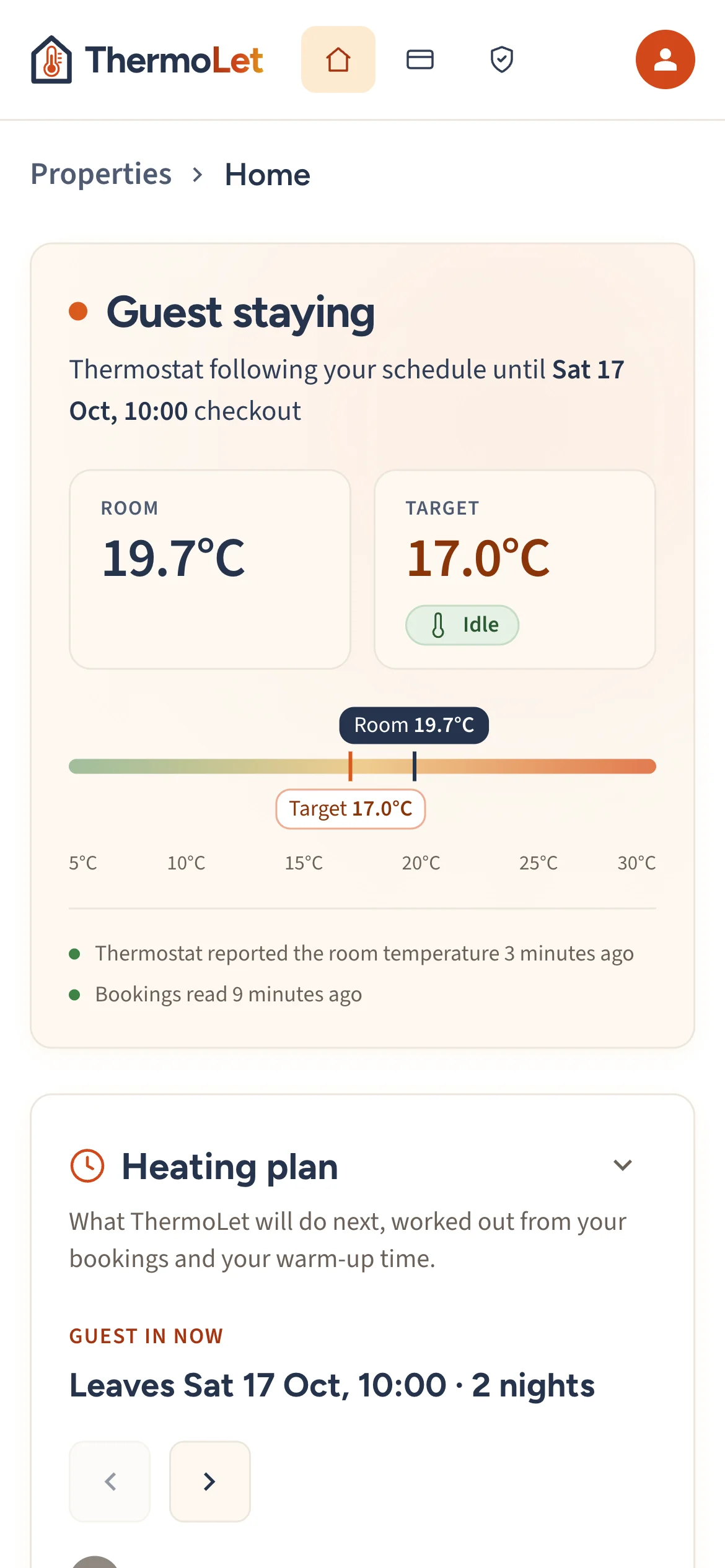
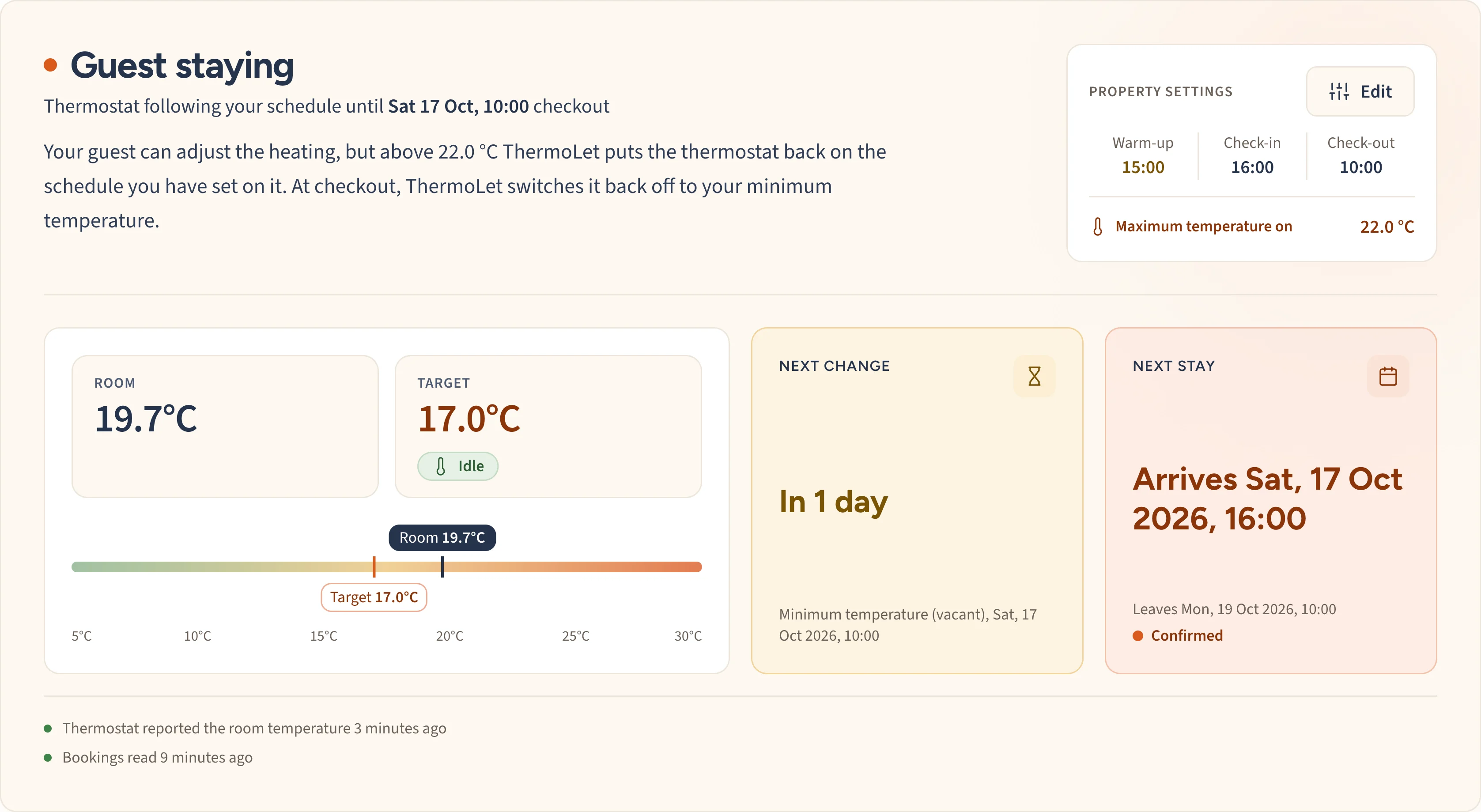
What changes when your heating follows your bookings
Without ThermoLet
- The schedule heats an empty house between stays
- You remember to turn it down after every checkout
- You remember to turn it back up before every arrival
- Guests turn it up to 27°C and leave it there
- Late bookings and cancellations catch you out
With ThermoLet
- Held at your minimum temperature while it's empty
- Back down automatically at checkout
- Back on at the warm-up time you choose
- Set an optional maximum and a boost past it is cancelled
- Calendar changes picked up within the hour
What happens to your heating
-
After checkout
No energy wasted between stays
It drops your heating to the minimum temperature set on your thermostat while the house is empty. New bookings and cancellations are picked up within the hour.
-
Before guests arrive
Ready for arrival
Your normal heating schedule goes back on at a warm-up time you choose, so the house has time to heat before guests walk in.
-
During the stay
Guests use the thermostat normally
Your regular schedule runs, and guests change the temperature as normal. Set an optional maximum and ThermoLet cancels a boost once the room passes it.
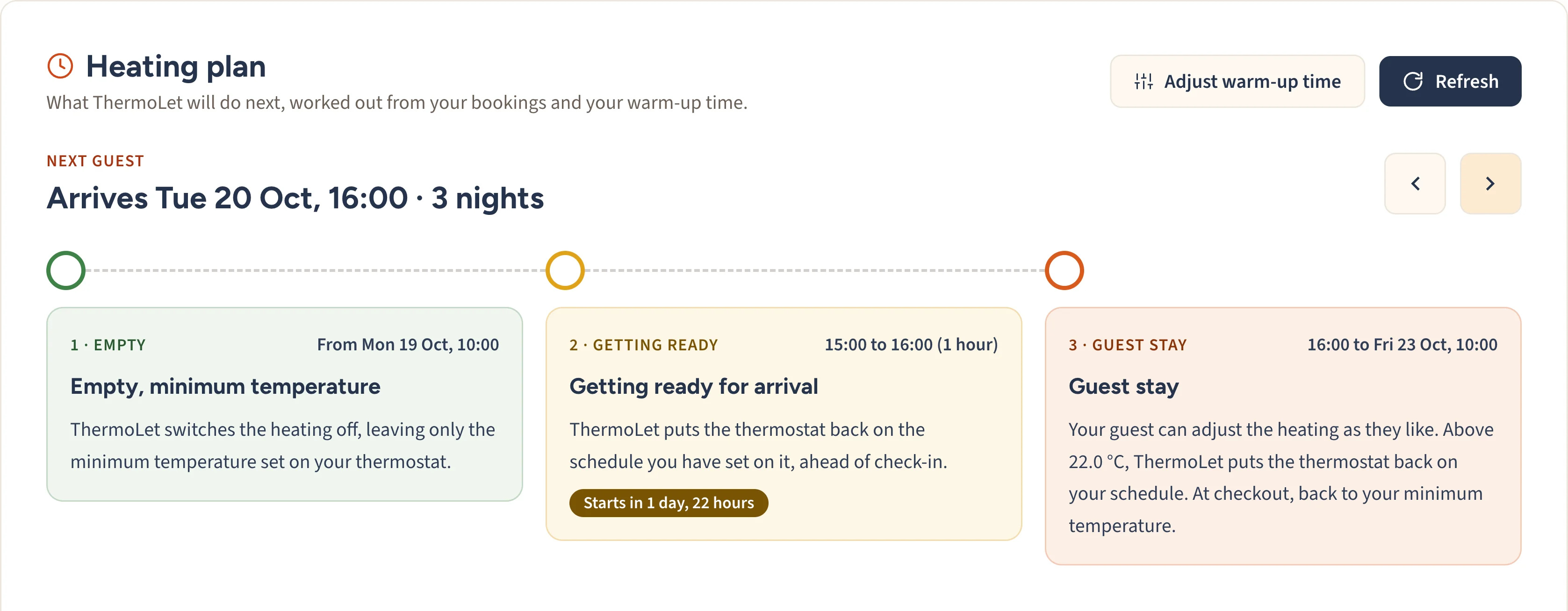
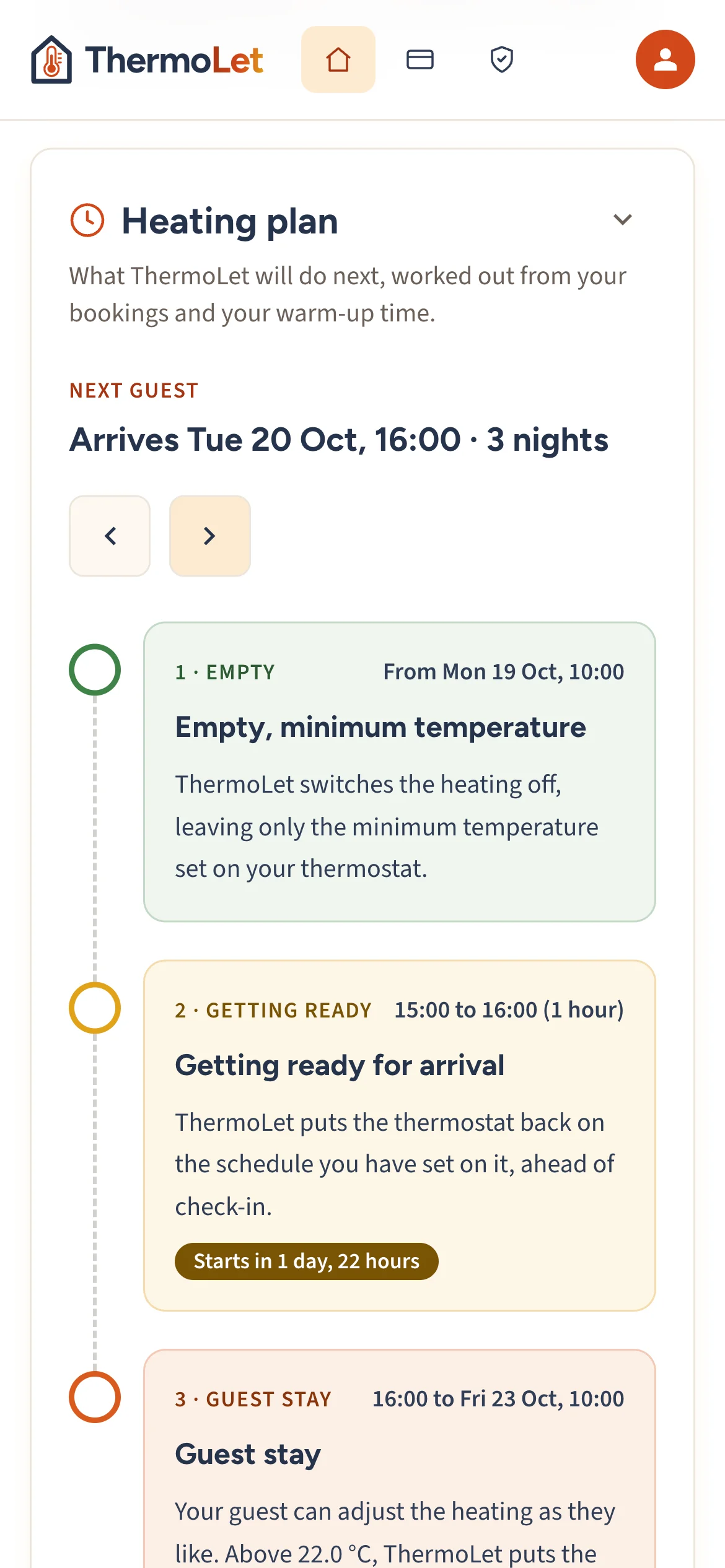
For example: guests booked from Friday to Sunday, with a 15:00 check-in, a 10:00 checkout and a 13:00 warm-up. Your own times are yours to set.
- Friday 13:00Warm-up starts for a 15:00 check-in
- Friday to SundayGuests are in, and your normal schedule runs
- Sunday 10:00Checkout, and the heating drops to your minimum temperature
- Monday to ThursdayNo booking, so it stays at your minimum
- Next Friday 13:00Warm-up starts for the next guests
Use less energy when your property is empty
ThermoLet stops your heating schedule running when nobody is staying, and an optional maximum temperature stops guests running it flat out. How much you save depends on your property, your heating system and your tariff.
You stay in charge
It can't lock you out of your own heating. Your guests keep normal control of the thermostat while they're in. Staying yourself? Block the dates on your calendar and it heats them like any other stay. Want the thermostat back for good? Disconnect the property in ThermoLet and it's yours straight away. Nothing is deleted, and you can reconnect whenever you like.
Peace of mind
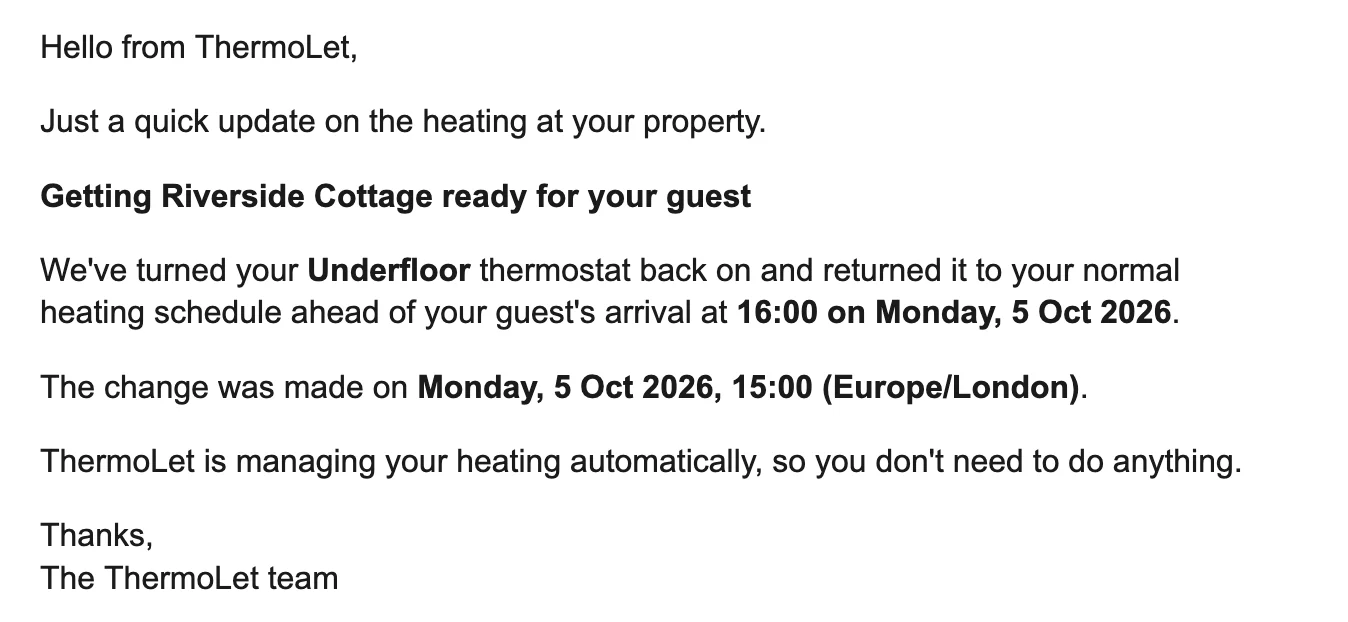
Know when it changes your heating
Switch on emails for a property and ThermoLet lets you know when it warms the house before an arrival, and when it turns the heating back down after checkout.
See everything, from anywhere
Every property's next arrival, when the heating comes on, the current temperature and the bookings it's following, all in one place. Change your times or maximum temperature from your phone, tablet or laptop, in the browser, with no app to install.
Getting set up
Book a call
Tell me a bit about your property. No credit or debit card needed. I'll email you within a day or two to find a time.
A 15-minute call
We connect your booking calendar and your thermostat together on a video call, including the free Samsung account and the one-off step that links SmartThings to your Hive account, if you haven't done them yet. Nothing technical, and you can ask me anything.
It takes over
From then on, the heating follows your calendar, and I keep an eye on your property for the first few weeks. Nothing is charged until your 30-day free trial ends, and you can cancel before then.
You'll need Wi-Fi at the property, a smart thermostat, and the calendar link from wherever you take bookings. Not sure what that is? I'll help you find it on the call. Hive is supported today and more brands are being tested now, so tell me which thermostat you have when you sign up.
No property management system (PMS) or channel manager software needed. Works alongside them if you have one.
£6 a month or £66 a year
That's per property, and paying yearly saves you £6. Your first 30 days are free, I set your property up personally, and your price stays fixed for as long as you stay subscribed, even if the price goes up for new hosts later. The launch offer is for the first 25 hosts only, so I can set each one up properly.
Book your free setupBook your free setup
Tell me when suits you, or ask for a demo first, and I'll email you to arrange a time. Happy to set it up yourself? Start your free trial instead.
You're in.
I'll email you within a day or two to arrange a call. Nothing to pay yet.
Why I built ThermoLet
I'm Martin. I run a holiday let in Staffordshire, and I've spent over 20 years building software for a living. Two things kept costing me money: I'd forget to turn the heating down between stays, and guests would set it to 27°C and open the windows. The heating had no idea whether anyone was in the house, so I connected it to the booking calendar.
It's been running on my own let ever since. If you sign up, I'll set your property up with you, keep an eye on how it behaves over the first few weeks, and answer your emails myself.
Martin, ThermoLet · [email protected]
Questions
Can I still change the heating myself?
Yes. You set your schedule in your thermostat's own app as you do now, and ThermoLet never changes it. The one exception is an empty house: turn the heating up between stays and ThermoLet puts it back to your minimum temperature.
What exactly does it do to my heating?
After checkout it drops the heating to the minimum temperature set on your thermostat. Ahead of an arrival it puts your normal schedule back on at the warm-up time you choose. It never changes your schedule, never sets a temperature itself, and never touches your boiler.
Does this meet my insurance requirements?
Set the minimum temperature on your thermostat to what your insurer asks for. While the house is empty ThermoLet drops the heating to that setting and never changes it. Checking your policy's terms is still your responsibility.
What if something goes wrong?
Your guests can always change the temperature at the wall, and you can disconnect ThermoLet at any time. If the property's internet drops, the thermostat carries on in whatever mode it was last in.
Do I need to buy anything?
No. Hive connects through Samsung SmartThings, so you need a free Samsung account and the SmartThings app, which works on iPhone as well as Android and needs no Samsung hardware. Adding Hive to it is a one-off step that takes a few minutes, and I do it with you on the setup call.
What does it cost?
£6 a month per property, or £66 a year. 30-day free trial, cancel any time. Launch offer: the first 25 hosts get personal setup and a price held for as long as they stay subscribed. ThermoLet is not VAT registered, so the price you see is the whole of it.
What's an iCal link?
A calendar link your listing publishes so other services can see which dates are booked. Airbnb, Booking.com and Vrbo each have one in their calendar settings. If you use a channel manager such as Guesty, use its link instead, because it combines your bookings from every site. I help you find yours on the setup call.
I take direct bookings. Does that work?
Yes. If your booking system publishes a calendar link, add that. If it doesn't, block the dates on Airbnb or Booking.com and ThermoLet heats them like any other stay.
What if I'm staying there myself?
Block the dates on your calendar and ThermoLet heats them like any other stay.
What if I block dates and nobody is staying?
Set that block to "Keep at minimum temperature" in ThermoLet and the heating stays down, as it does whenever the house is empty.
What if a booking changes late?
ThermoLet re-checks your calendar every hour, so late bookings and cancellations are picked up automatically.
Do my guests need an app?
No. Guests use the thermostat on the wall exactly as they would anywhere else.
What data do you see about my property?
Your booking dates and times, your thermostat temperature and whether the heating is on. No guest names, no payment details, nothing about who is staying.
What if I have more than one property?
Each property connects and is priced separately, with its own calendar, times and maximum temperature.